GPS Tracking - Number Locator
サウズヒロMaps & Navigation
4.10.00 Reviews
- Version
- 1.0.2
- Installs
- 100.00K
- Age Rating
- Everyone
Screenshots
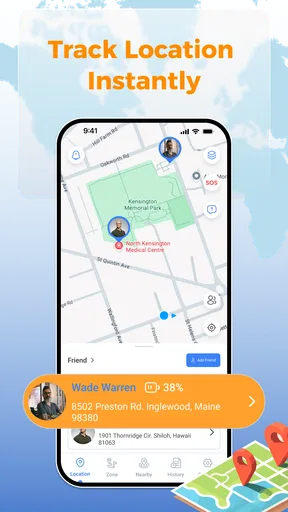
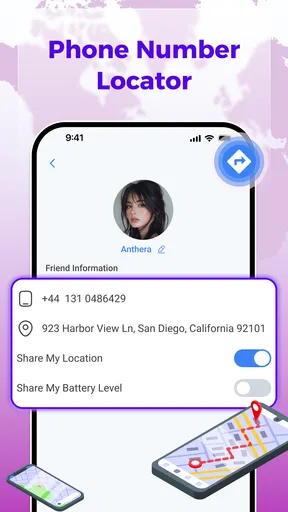
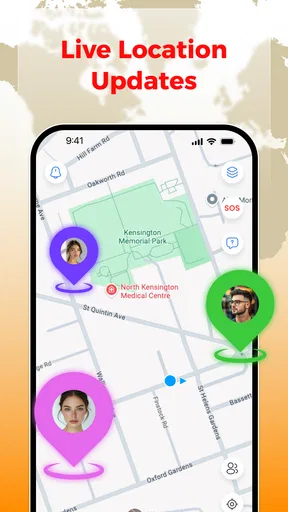
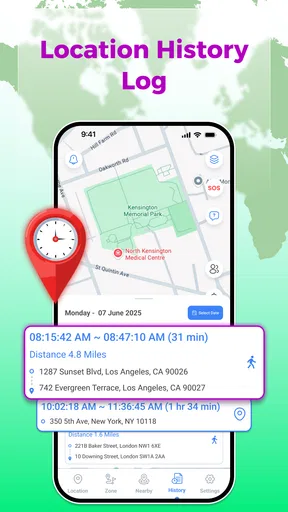
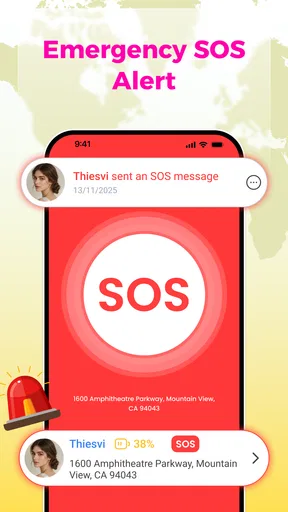
Our Review of GPS Tracking - Number Locator
 Analysis by Appyee
I approached GPS Tracking - Number Locator as a practical Maps & Navigation app rather than as a general-purpose social tool. Its focus is straightforward: helping people think about family safety, phone-number location, and real-time whereabouts from a mobile device. That narrow purpose can be useful, but it also means the app makes the most sense when everyone involved understands how location sharing is being used.
The app is free, aimed at Everyone, and comes from the developer サウズヒロ. It has reached over one hundred thousand installs and holds a 4.1 average from around two hundred ratings. Those figures suggest that it has attracted a meaningful audience, although I would still treat it as a focused utility to test carefully rather than automatically replacing a navigation service I already trust.
How the experience feels in everyday use
I’d use this section to focus on the small habits that make a location check more useful than simply opening a map: agree in advance on when checking is welcome, and choose a clear landmark or meeting point for places where a pin may be hard to interpret. That keeps the tool practical without turning it into constant monitoring. The next section looks at where this kind of focused locator fits best.
Readability and navigation come first
For a location tool, the most important quality is not visual decoration. I want to understand where I am, what the app is showing, and what action I should take without hunting through crowded screens. The promise of GPS Tracking - Number Locator is easy to grasp, which gives it a useful advantage for people who are not comfortable with complicated mapping software.
I would recommend approaching the app with a simple routine: open it before a journey, identify the person or number you need to check, and confirm that the displayed location makes sense before relying on it. That habit is more useful than repeatedly refreshing a map without knowing whether the result is current. Real-time location tools can create false confidence if a user assumes every point on a screen is perfectly precise.
The app’s purpose may also help people who struggle with long menus or unfamiliar technical terms. A family member who only needs a basic way to think about a relative’s whereabouts may find a dedicated locator less intimidating than a full navigation platform packed with route planning, traffic layers, saved places, and travel features.
At the same time, a focused interface is not automatically accessible to everyone. People with low vision may need larger system text, stronger contrast, or a screen reader to make the app comfortable. I would check those settings on the device before depending on the app during an urgent situation. Readability is especially important when looking at a map outdoors, where glare can make small labels difficult to distinguish.
Useful for simple family routines
A realistic example is a parent waiting for a teenager after an evening activity. Instead of sending several messages asking whether the journey has started, the parent can use a location-focused tool as part of a previously agreed routine. The teenager still deserves to know when location is being checked, and both people should understand what the map result means. Used that way, the app can reduce unnecessary calls without turning ordinary travel into constant supervision.
Another scenario is coordinating a meeting point with a family member who is not confident with directions. A locator may help the person waiting understand whether the other person is still travelling or has reached the area. I would not use it as a substitute for a clear meeting instruction, because a map position alone does not explain whether someone is inside a building, on another floor, or approaching from an inaccessible entrance.
This is where the app differs from usual alternatives. A standard map application is generally better when I need turn-by-turn directions, public transport information, business details, or route comparisons. A messaging app may be better when the main requirement is a temporary location share inside an existing conversation. GPS Tracking - Number Locator is more appealing when the central question is simply about locating a family member or number, without the extra weight of a full travel platform.
Motor and sensory considerations
Location checking can be easier for people who find typing difficult, especially if the app reduces the need to enter long messages or explain directions repeatedly. A family member with limited hand movement may prefer a quick visual check to composing several updates. However, that benefit depends on the actual controls being easy to tap and clearly labelled on the user’s device.
I would set up the app when seated and unhurried, not while walking, driving, or dealing with an unfamiliar place. This is an important accessibility and safety distinction. Small targets, map gestures, and moving vehicles do not mix well. If a user has tremors or reduced precision, a companion can help with initial setup, while the person retains control over when location information is shared and how it is interpreted.
For users with hearing loss, a location view can be more useful than relying on phone calls to coordinate a meeting. For users with limited vision, the opposite may be true: a spoken call or a trusted person describing the situation could be more dependable than a map. I would not assume that a visual location display works equally well for every sensory need. The right choice depends on whether the person can perceive the map, understand its context, and act on it safely.
People who are sensitive to visual motion may also prefer to avoid unnecessary map movement or repeated screen changes. My practical advice is to use the app for a specific check, then put the phone away. Constantly watching a moving location is tiring, and it can encourage a user to focus on the screen instead of the surrounding environment.
Situational access matters more than the feature list
GPS tools are affected by the place where they are used. Outdoors in an open area, a location display may be easier to interpret than inside a large building, underground space, or dense urban environment. A person waiting at a hospital, shopping centre, or transport hub may see a position that is close enough to identify the general area but not detailed enough to find the correct entrance.
That limitation matters for older adults, visitors, and anyone who becomes disoriented in busy spaces. I would pair the app with a plain-language plan: name the entrance, choose a visible landmark, and agree on what to do if the map position stops updating or appears ambiguous. The app can support that plan, but it should not be the entire plan.
It may also help during family travel when people separate temporarily. One person can check the general whereabouts of another instead of repeatedly calling. Yet this only works well when phones are charged, the people involved have agreed to the arrangement, and everyone knows that location information can be delayed or misunderstood. Those practical conditions are more important than the convenience of opening a map.
The age rating of Everyone makes the app broadly approachable from a content perspective, but that should not be confused with suitability for unsupervised location sharing. Children and vulnerable adults need an especially clear explanation of who can see a location, when checking is appropriate, and what to do if the information looks wrong. I would involve a trusted adult in setup rather than handing over a location tool without a conversation.
What I would check before relying on it
My first check would be whether the app’s displayed result matches a known situation. I would test it while a family member is in a place we can identify, then compare the result with the person’s actual location. This is a simple but valuable workflow because it reveals whether the app is understandable for the people who will use it, not just whether it opens successfully.
My second check would be the phone’s permission and system settings. Location applications depend on device-level access, and settings can affect how consistently a position is available. I would review those controls together with the person being located, rather than changing them secretly. This also gives users with different abilities a chance to adjust text size, display contrast, magnification, or spoken assistance before an urgent need arises.
A third useful habit is to agree on a fallback message. If the map is unclear, the person can send a short update such as the name of a building or meeting point. This is particularly helpful for users who cannot easily interpret map details. It also prevents the common mistake of treating a location dot as a complete explanation of someone’s situation.
The current version is 1.0.2, and the minimum operating system is Android 9. I would therefore check the phone’s software before recommending it to someone using an older device. That is not merely a technical detail: people who rely on older phones may have fewer display options, slower performance, or difficulty installing newer applications. A family should test the exact handset rather than assuming that the same experience will be identical everywhere.
Remaining barriers and privacy-sensitive choices
The biggest barrier is interpretation. A location number or map position can look authoritative even when the user does not know how recent it is or what area it represents. Someone with memory difficulties, anxiety, or limited experience with maps may need another person to explain the result. I would describe the app as an aid to communication, not as proof that a family member is safe.
There is also a social barrier. Location tracking can feel supportive to one person and intrusive to another. The most inclusive approach is transparent use: explain the purpose, agree on the times or situations when checking is acceptable, and avoid using the app to pressure someone into answering immediately. Respectful consent is especially important when the person being located has limited digital confidence or depends on a caregiver.
Users who need detailed navigation may find the app too narrow compared with established map services. If I needed accessible walking directions, transit instructions, route alternatives, or reliable place information, I would choose a navigation app designed around those tasks. If I only needed a temporary check-in with a friend, a messaging service with location sharing might involve fewer steps because the conversation is already there.
I would also avoid making it the sole tool for emergencies. A map-based locator cannot replace local emergency services, a phone call, a medical alert arrangement, or a prearranged family procedure. In a crisis, the user needs a clear escalation plan that does not depend on interpreting a screen under stress.
Who should use it, and who should skip it?
I think GPS Tracking - Number Locator is best for families who want a dedicated, relatively focused way to discuss location and who are willing to test it together. It may suit people who find full navigation apps overwhelming, relatives who prefer visual coordination to repeated calls, and households that can establish clear boundaries around checking.
I would skip it if the main goal is route planning, accessible turn-by-turn travel, public transport, or detailed place discovery. I would also skip it for a person who cannot reliably understand location uncertainty unless a trusted helper is involved. In that situation, a simpler check-in routine may be safer and easier than adding another map-based tool.
The free price makes experimentation less demanding, but free does not remove the need for careful setup. I would spend a few minutes testing the workflow, checking whether the display is comfortable, and agreeing on a backup method. That small investment can reveal whether the app actually reduces stress or simply adds another screen to manage.
My inclusive verdict
After looking at it through the needs of different users and situations, I see GPS Tracking - Number Locator as a focused family-location utility with a clear everyday role. Its strongest quality is concentration: it is built around the question of where someone is, rather than surrounding that question with every possible mapping feature.
That focus can make it approachable, but it does not solve every accessibility problem. People with visual, motor, hearing, cognitive, or situational needs may experience the app very differently depending on their phone settings, the environment, and the support available during setup. I would recommend testing it with the actual people who will use it, not judging it only from the store page.
My recommendation is cautious but positive: try it for agreed family check-ins, use it alongside clear verbal plans, and treat every displayed location as helpful context rather than absolute certainty. For that specific purpose, the free app is worth exploring. For navigation, emergencies, or users who need highly specialized accessibility support, a different tool may be the better choice.
Verdict
Strengths of GPS Tracking - Number Locator
- Simple interface makes location searches easy to start.
- Can be useful for sharing your location with trusted contacts.
- May help identify approximate areas from available location data.
- Location tools can be convenient during travel or emergencies.
- Works as a lightweight utility on compatible Android devices.
Limitations of GPS Tracking - Number Locator
- Results may be approximate and should not be treated as live precision tracking.
- Some features may require a subscription or in-app purchases.
- Location accuracy depends heavily on GPS, network, and device settings.
- Background location use can increase battery consumption.
- Privacy permissions should be reviewed before entering or sharing phone numbers.
Similar Picks in This Category
View All
Uber - Request a ride
Uber Technologies, Inc.4.7


inDrive. Rides with fair fares
® SUOL INNOVATIONS LTD4.8

Yandex Go: Taxi Food Delivery
Mikromobilnost LLC Belgrade4.8

Bolt: Request a Ride
Bolt Technology4.8

Rapido: Bike-Taxi, Auto & Cabs
Rapido Bike Taxi4.8
Frequently Asked Questions
What is GPS Tracking - Number Locator, and what does it actually do?
GPS Tracking - Number Locator is designed to help users identify a phone number’s general location and, depending on the available features, view location information through GPS-based tools. It is important to understand that a phone number alone normally cannot reveal someone’s exact real-time position. Results may be approximate, depend on network and device data, and should not be treated as a guaranteed tracking service.
Can GPS Tracking - Number Locator track any phone number without the owner knowing?
No legitimate location app should be used to secretly monitor another person. GPS Tracking - Number Locator may require permission to access location services, contacts, or other device information, and accurate live tracking generally requires consent on the target device. Users should only track their own phone or people who have clearly agreed, because unauthorized monitoring can violate privacy laws and the app’s terms of use.
Does the app provide an exact real-time GPS location?
The accuracy of the information can vary considerably. GPS signal strength, mobile network coverage, Wi-Fi availability, device settings, battery-saving modes, and permission status all affect results. A number lookup may show an estimated region or carrier-related information rather than an exact address. Before downloading, users should avoid assuming that the app can locate any phone precisely and continuously.
Is GPS Tracking - Number Locator free to download and use?
The application may be available to download at no initial cost, but some tools can require in-app purchases, a subscription, or payment after a trial period. Users should carefully review the pricing screen, renewal terms, and cancellation instructions before confirming access. Checking the official Google Play or App Store listing is also recommended, since prices and available features can change by country and platform.
What permissions and privacy considerations should users check first?
Before using GPS Tracking - Number Locator, review every permission it requests, particularly access to location, contacts, phone information, notifications, and background activity. Grant only permissions that are necessary for the feature you intend to use. Read the privacy policy to learn how data is collected, stored, shared, and deleted, and avoid entering sensitive personal information unless the app’s practices are clear and acceptable.
